





Timeline is a feature-rich solution designed for your businesses that need a robust and compliant time management system.









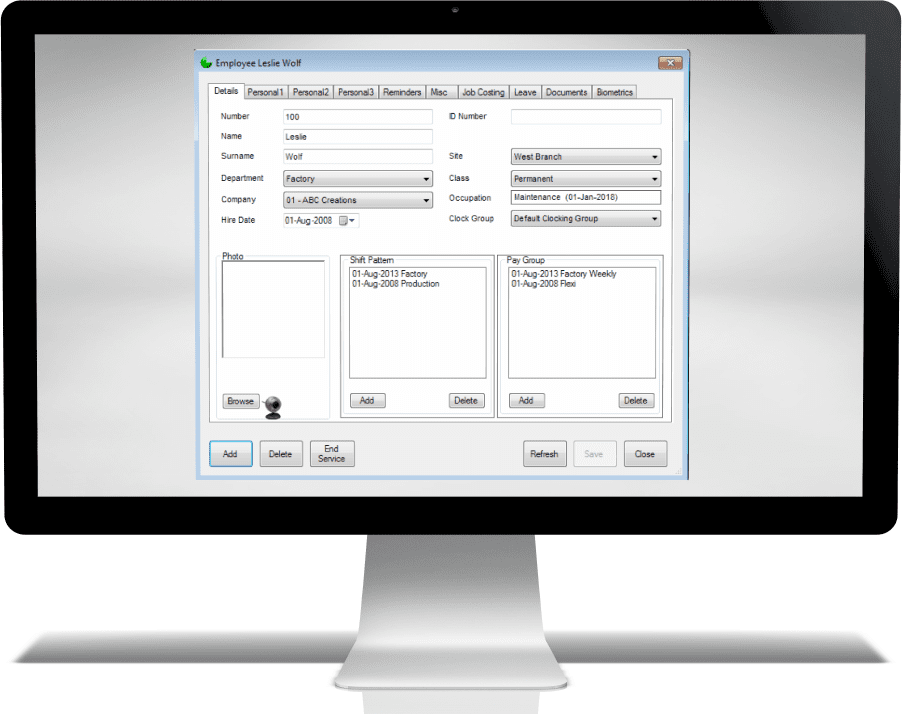
Quick Employee Identification – View and edit employee number, name, surname, and ID number in one panel.
Department & Location Assignment – Easily set department, company, site, and clocking group for accurate reporting.
Employment Details – Track hire date, job class (e.g. permanent), occupation, and start dates for roles.
Shift Pattern Management – Assign and view multiple shift patterns with start dates.
Pay Group Linking – Connect employees to one or more pay groups for correct payroll allocation.
Photo & Biometric Setup – Upload employee photos and manage biometric registration directly from the screen.
Tabbed Navigation – Access personal details, reminders, job costing, leave, documents, and biometric records without leaving the profile.
Management Tools – Add new employees, delete records, or end service with proper documentation.
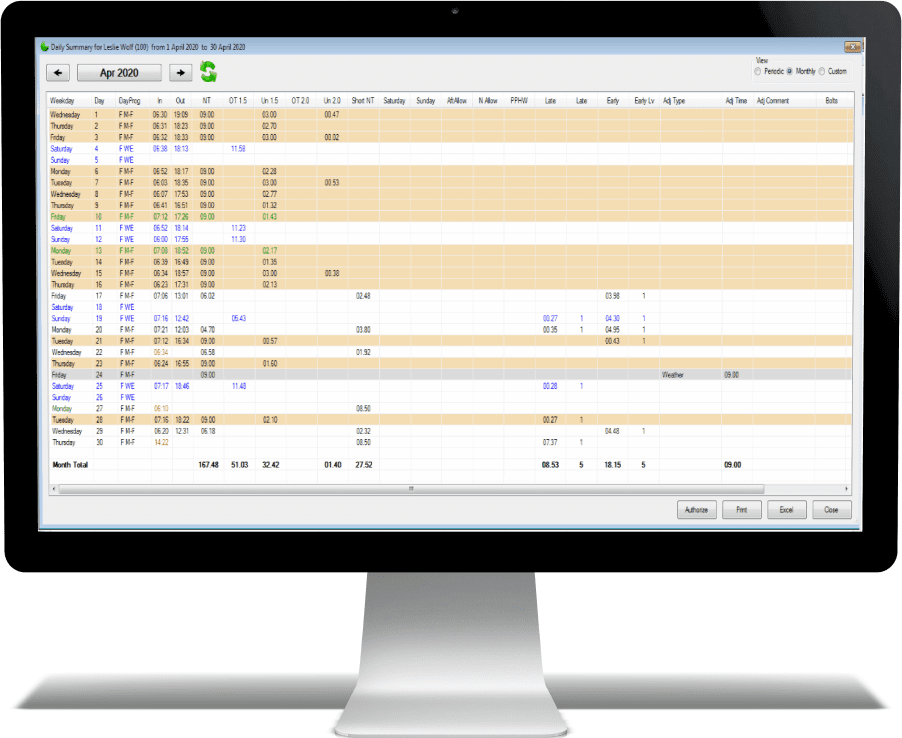
Customisable Columns – Choose exactly which time categories (e.g. NT hours, overtime, leave, unpaid) are displayed for quick analysis.
Count Categories – Add numeric counters such as shifts worked, absences, late arrivals, or job counts for instant productivity insights.
Real-Time Updates – See the latest clockings in real time
Drill-Down Capability – Click on any total to open the detailed daily transactions behind it.
Export-Ready – One-click export to Excel.
User-Specific Layouts – Save different column and view preferences for each user profile.
Colour-Coded Highlights – Easily spot anomalies, exceptions, or policy breaches at a glance.
Payroll ready – Live balancing of hours.
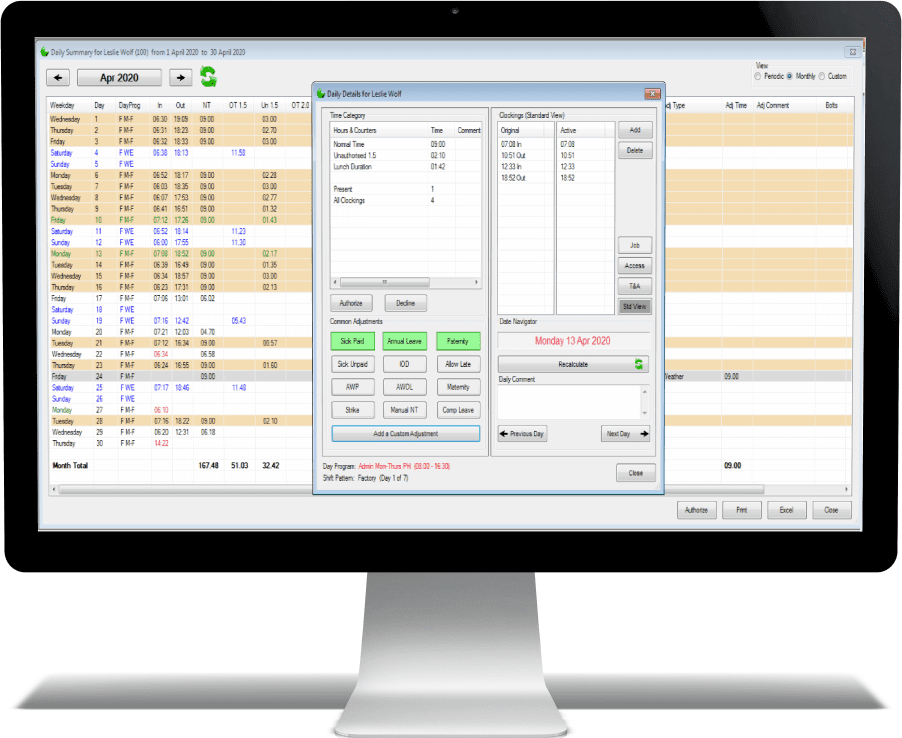
Quick Adjustments – Add or edit leave types such as annual leave, sick leave, and compassionate leave directly on the timeline.
Easy Hour Overrides – Manually adjust worked hours for non-leave events without affecting the rest of the schedule.
Clocking Corrections – Fix incorrect or missing clockings with just a few clicks.
Reason Capture – Insert clear, trackable reasons for every change to maintain compliance and transparency.
Seamless Date Navigation – Move between days for the same employee without leaving the screen.
Live Validation – See updates reflected immediately in totals and exception flags.
Supervisor-Friendly Layout – Compact, logical design to speed up daily management tasks.
Payroll Accuracy Boost – Ensures correct and verified time data is sent to Payroll.
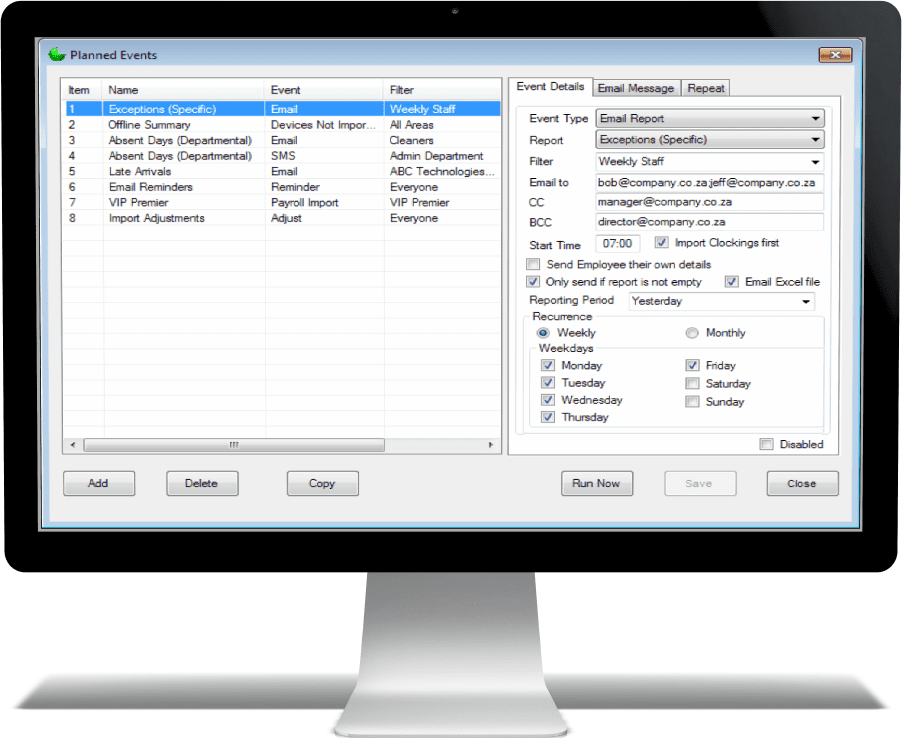
Multi-Channel Communication – Deliver updates via Email, SMS, Payroll employees and leave import and reminders to match user preferences.
Logical Information Flow – Grouped sections (Event Details, Email Message, Repeat) for intuitive navigation.
Action-Oriented Controls – Add, Delete, Copy, Run Now, Save, Close.
Targeted Event Filtering – Filter by groups (e.g., Weekly Staff, Admin Department) for relevant results.
Flexible Scheduling – Recurrence options: Daily, Weekly, Monthly, or custom schedules.
Smart Delivery Rules – Conditions like “Only send if report is not empty” to prevent spam.
Precision Recipient Management – Fields for To, CC, BCC with pre-filled addresses.
Data Sharing Made Easy – Attach reports as Excel or PDF files for easy access.
Personalized Reports – Send each employee their own tailored details.
Time-Sensitive Data – Predefined ranges (Today, Yesterday, Last 7 days, last period etc.) or custom dates for timely delivery.
Instant Testing – Run Now button for immediate event verification.
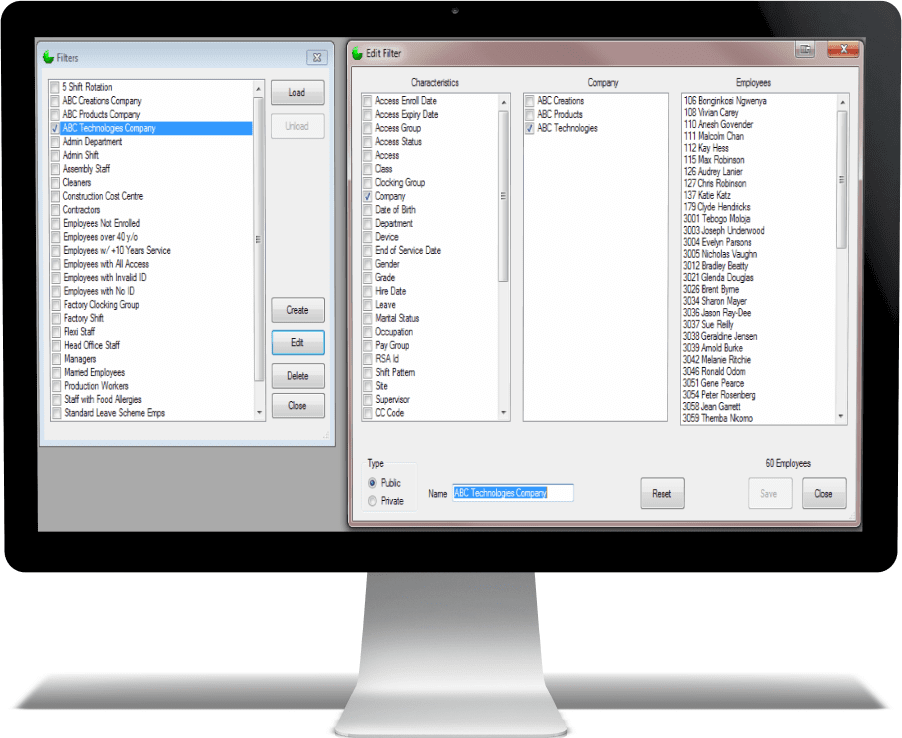
Instant Employee Grouping – Create filters to quickly display employees based on specific criteria.
Extensive Filter Options – Choose from characteristics such as department, site, occupation, pay group, shift pattern, hire date, leave status, and more.
Multi-Criteria Selection – Combine multiple filter attributes for precise employee targeting.
Company & Employee View – Instantly see which employees match the selected filter across companies.
Custom Filter Names – Save filters with descriptive names for easy recall and reuse.
Public or Private Filters – Share filters with your team or keep them for personal use.
Edit & Update with Ease – Modify existing filters without starting from scratch.
Employee Count Display – See exactly how many employees match your selected criteria.
Quick Actions – Create, load, edit, delete, or reset filters with just a few clicks.
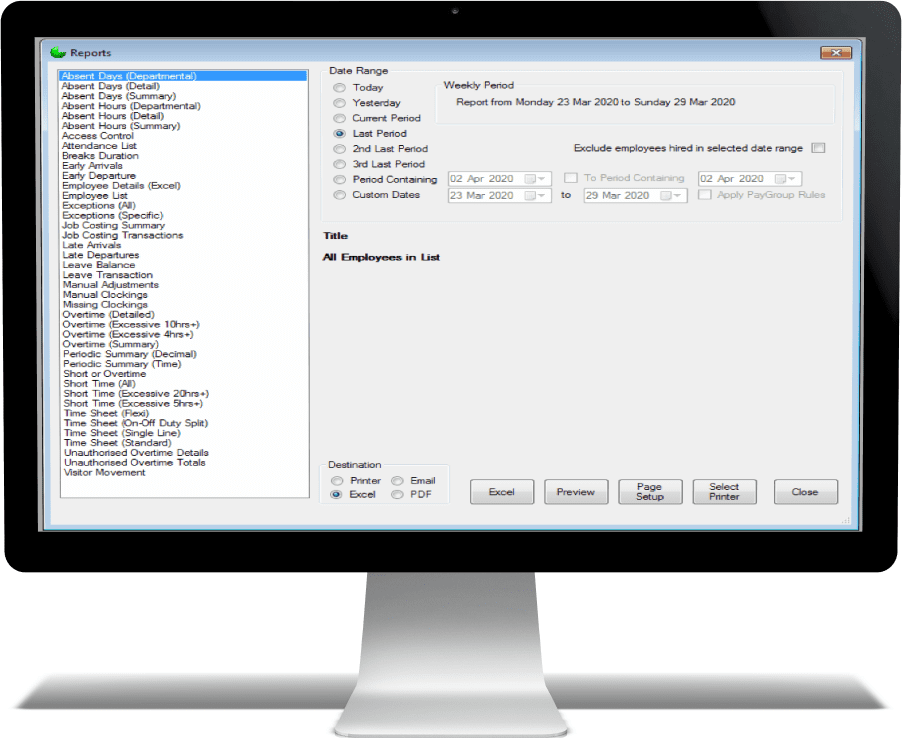
Comprehensive Report Library – Access a wide range of pre-built reports covering absenteeism, overtime, timesheets, leave, job costing, and more.
Custom Date Ranges – Generate reports for today, yesterday, current period, last period, or fully custom date ranges.
Smart Filters – Exclude employees hired in a specific date range or apply pay group rules for accurate data segmentation.
Clear Period Display – Instantly see the exact reporting period for full transparency.
Multi-Format Export – Output reports to Excel, PDF, or send them directly via email.
Print-Ready – Built-in page setup and printer selection for professional hard copies.
Preview Before Export – Check reports on-screen before saving or sharing.
Wide Coverage – Includes detailed metrics such as early arrivals, late departures, missing clockings, unauthorized overtime, short time, and visitor movements.
One-Click Access – Quickly select, preview, and produce reports without complex setup.
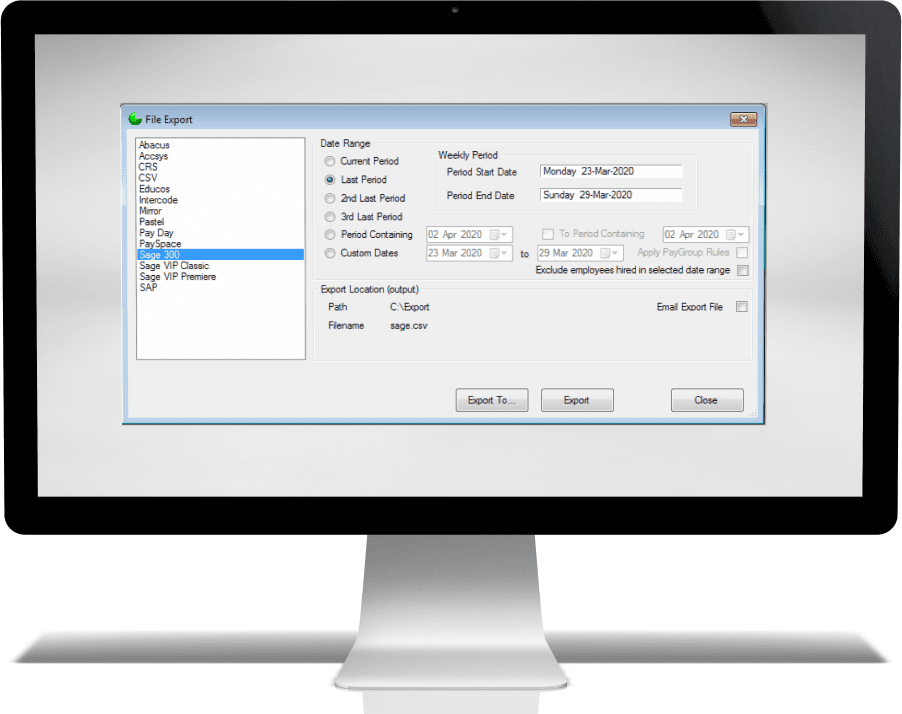
Supports Diverse Payroll Systems:
Exports data in formats compatible with major payroll platforms like Sage Classic/Premier, Sage 300, SAP, PaySpace, Pastel and CSV (for universal use).
Ensures seamless integration without manual capturing.
Batch Customization:
Users can select specific payroll systems (e.g., Sage VIP Premier, Pay Day) to generate tailored export files.
Eliminates errors caused by mismatched file structures.
Predefined Periods:
Options like Current Period, Last Period, or Custom Dates let users export data for specific payroll cycles.
Reduces manual date entry errors.
Weekly/Monthly Alignment:
Aligns with payroll processing schedules (e.g., Monday 23-Mar to Sunday 29-Mar).
Ensures data matches the payroll period requirements.
PayGroup Rules:
Applies company-specific payroll grouping logic during export (e.g., department-based rules).
Ensures compliance with organizational policies.
Exclusion Filters:
"Exclude employees hired in selected date range" prevents incorrect payroll entries for new hires.
Avoids overpayment or duplicate onboarding.
Local or Network Paths:
Files can be saved to C:\Export or custom directories for easy retrieval.
Ensures centralized, secure storage.
Email Automation:
"Email Export File" sends reports directly to payroll teams or accountants.
Saves time by bypassing manual file sharing.
Eliminates Manual Entry:
Automated exports remove the need to rekey data into payroll systems.
Reduces human error and reconciliation time.
Faster Processing:
Batch exports ("Export To...") allow multiple payroll runs in one action.
Cuts down processing time from hours to minutes.
Compliance & Audit-Ready:
Structured exports include timestamps and period labels for traceability.

We strive for every customer to utilise the system to its full potential
Timeline is designed with simplicity in mind, so even users with minimal technical skills can operate it confidently. The interface is clean and intuitive, with clearly labeled menus and step-by-step prompts for common tasks like adding employees, adjusting hours, and generating reports. Most day-to-day functions can be done in just a few clicks, and the system includes built-in help and tooltips for guidance. Whether you’re clocking in, reviewing attendance, or exporting data to payroll, the process is quick, logical, and easy to learn.
Definitely. Jarrison Time supports complex scheduling, including rotating shifts, split shifts, night shifts, and flexible working hours. You can set up rules once, and the system will automatically apply them when processing attendance—making it perfect for manufacturing, retail, construction, and more.
Absolutely. Jarrison Time automates the calculation of worked hours, overtime, and leave, eliminating the need for manual entry. You can export data directly to popular payroll software, reducing admin time and ensuring accuracy. Many businesses report cutting payroll preparation time by more than half.
Absolutely. Whether you have 10 employees or 1,000, Jarrison Time can scale to your needs without compromising speed or accuracy.
Yes. Jarrison Time integrates seamlessly with a wide range of biometric fingerprint and facial recognition devices. This ensures secure, accurate clock-ins and prevents buddy punching, giving you full confidence in your time records.
Most teams are up and running within a day or two. The system is straightforward, and with our guided setup and training, your staff will be comfortable using it in no time.
We have cloud functionality planned for the future, but right now, Jarrison Time is powered by the reliability of SQL databases—meaning you retain full ownership and control of your data. Selected readers already use cloud connectivity to download clocking data remotely, giving you the best of both worlds: secure local data management with the convenience of certain cloud-enabled features.
Definitely. With automated calculations for hours, overtime, and leave, the system minimizes human error and ensures staff are paid accurately every time.
Yes. Jarrison Time gives you full visibility of sick leave, annual leave, and unplanned absences, helping you manage staffing levels effectively.
From daily clocking summaries to detailed overtime reports, Jarrison Time offers customizable reporting so you can get exactly the data you need, when you need it.
In most cases, yes. Jarrison Time can export data in formats compatible with popular payroll and HR systems, reducing duplicate data entry.
Yes. The system uses secure protocols and integrates with biometric devices to ensure that your attendance data is accurate and tamper-proof.

At Timeline Monitoring Supplies, we’re committed to providing outstanding service and reliable, high-quality solutions that help you save time and reduce costs.
We at Timeline stive for long term relationships. Providing the best in Time & Attendance Solutions
“Since implementing the Suprema Biometric system with Jarrison Time and Sage integration, managing our workforce has become far more efficient and secure. The system has paid for itself through the time saved and the accuracy it brings to payroll. It’s an essential part of our operations now.”
“Managing time and payroll across 16 different companies used to be a huge challenge. Timeline Monitoring Supplies delivered a biometric and software solution that just works—year after year. The transition to Sage 300 in the cloud was smooth and took our efficiency to the next level.”
“With over 1,500 employees across different countries, managing time and payroll used to be complex. Since implementing the biometric solution from Timeline Monitoring Supplies, our processes are faster, more accurate, and completely integrated with Sage 300. It’s made a big difference.”
“The addition of Shift Scheduling to our T&A solution has made a significant difference in how we manage staff rosters. Combined with Sage integration and biometric tracking, it has made our HR and payroll process more accurate and efficient than ever.”
Experience

Full Support

Training

Happy clients
© 2025 Timeline Monitoring Supplies cc
